A while back, Tyler promised inside coverage of the Narrative. I figured it’s about time to get into that. This post gets a bit technical, so I apologize now if this is boring to you, but hopefully some of you will find it interesting.
As Chris mentioned in a Kickstarter update, the Narrative Editor provides a means of directly editing the script without digging deep into the code. One of the issues we faced when first looking to tackle SpaceVenture is that there isn’t really anything out there that can incorporate narrative text and audio, associating them with objects in game and have it parse-able by code. (If anyone knows of something that DOES address all this, I would be interested to see how it was done; we found several that addressed it partially but for one reason or another none of them really worked). So we had to create one from scratch.
The team’s first quick and dirty solution (basically right after the Kickstarter ended) was to store the lines in a spreadsheet, stored on Google Drive for collaborative editing. This actually worked pretty well for what it needed to be – easy editing, uncomplicated design for the narrative writers, and mostly compatible with Unity – and was exported to CSV to import into Unity, which would then parse it.
The narrative editor
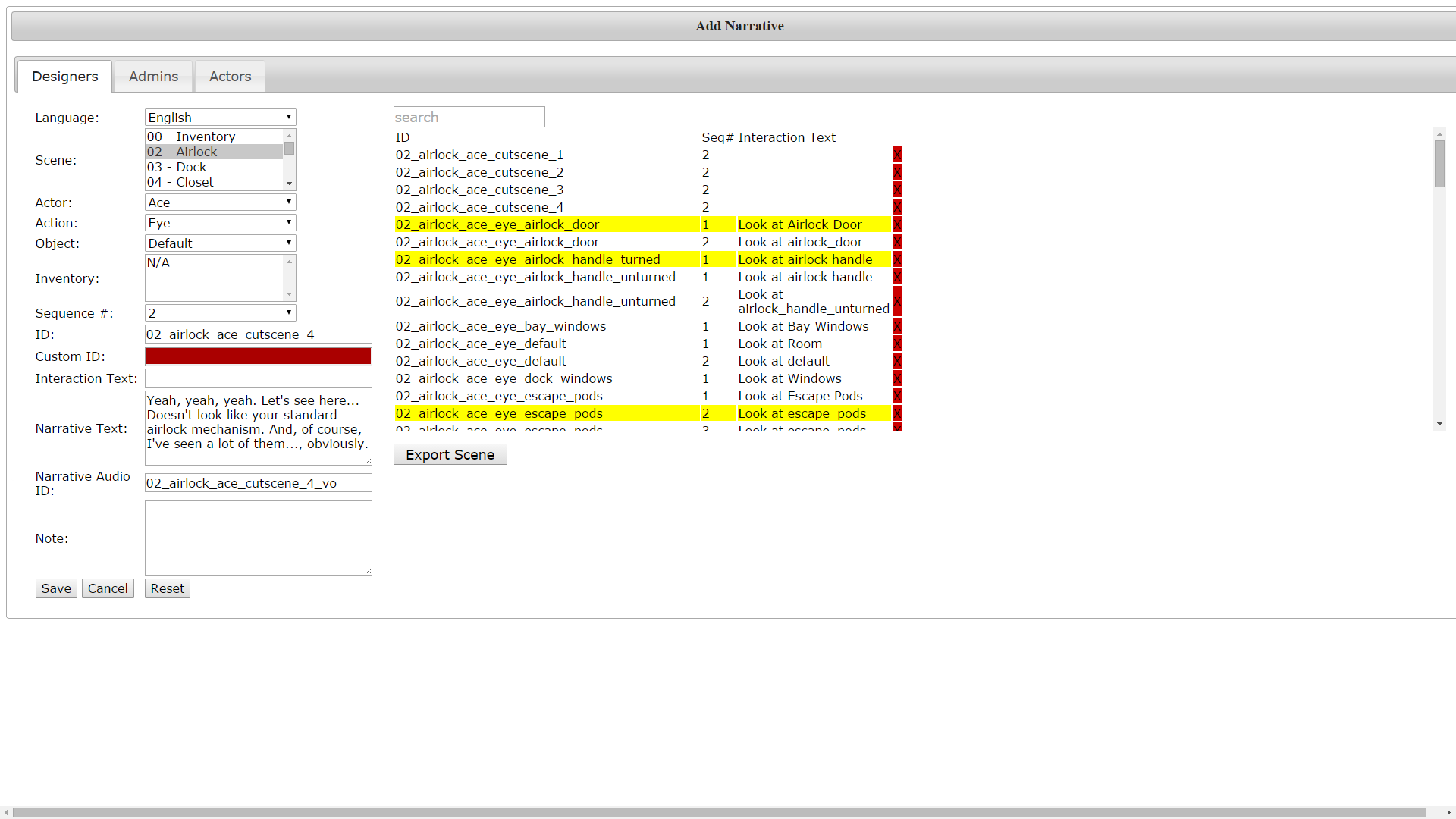
Well, as the script got larger this became unmanageable, as you might imagine. Tyler designed a SQL-backed narrative editor which could export to the same CSV format and so basically was able to quickly replace the old spreadsheet system.
The CSV format is great for a lot of things, but it’s designed to be a spreadsheet format more than a database. Once it got into Unity, the code to read the lines on-screen had to do a lot of parsing to make sure the right line was being retrieved, and a lot of patching to add alternative uses of the narrative meant that there were a lot of exceptions and it could break pretty easily.
Another problem was that this was highly dependent on scenes and objects. While you might think this is a proper way to go about it, this reasoning does lead to a lot of duplication of lines. Sure, the Guys like to have a lot of variety in their narrative, but there can be a lot of repeated lines even trying to avoid it (which is something I learned first in earlier fan-game work). Also, once you start getting into cutscenes and events not directly tied to objects or even scenes (think characters like Ace or Rooter which cross between scenes without necessarily changing narrative) this becomes a headache trying to make it work.
A fresh start
One of the first things I had to tackle when stepping up as lead programmer on the project was re-working the narrative to be actually less object-based. My first and main goal was that narrative lines should be able to be assigned to multiple objects. This meant a bottom-up redesign of the back-end database. I also wanted to get rid of the CSV-based system for Unity. So we needed a way to import data from a web-based database front-end into a serialized asset that Unity could parse. Finally, there were lingering usability concerns with the old narrative – it didn’t tend to make the best use of screen real estate. It was hard to read lines for a given object to see what was already there and edit it quickly.
Getting into it, I started out by quickly drafting the back-end database design on paper. I listed the various tables I would need as well as the fields in each table, including the foreign keys linking one table to another. After getting that set up (fairly roughly at first, the layout would be iterated upon later through trial-and-error) I wrote up some code to access the database, both reading and writing. The front-end of the narrative editor came next.
As you can see from the picture, the narrative writer should select first what scene they are working in, then the object within that scene, then the particular state of the object (has the cart been pushed or hasn’t it). Then they will select what actor (character) is doing the speaking, and what interaction is currently selected (if inventory then the item should be specified). This brings them to a list of “sequences”. Narrative sequences can be randomly or sequentially selected; they can loop after hitting the end of the list or repeat the last sequence indefinitely. When adding a sequence, the writer can either refer to an existing line by its (numeric) ID or add a new line, which fills in the ID automatically. The process is similar for cutscenes and other events, but the way in which they are called is different – they depend on developers referring to them in-game and are not called automatically by the narrative.
Bringing it into Unity

Once I had the basics of the web entry page in place, I used it to create a sample to test importing into Unity. I then wrote a script for Unity to parse the SQL database and serialize the data into its own custom classes. (This happens in the Editor, not in-game; you won’t be needing a connection to the Internet to see narrative). I added a menu option to run this method so that this all happens behind the scenes so that developers wouldn’t have to worry about dragging a CSV file into the right location.

One of the benefits of serialization is that changes to the narrative can be seen through Unity’s inspector. If the ID of an object is known, a developer can trace back to the line quickly without digging through a text file. Serialization also allows for use of LINQ to quickly query the database and retrieve the correct narrative. When the player clicks on an object, the game code goes through the same drill-down as described in the process for writers in the narrative editor:
- What scene are we in? (Also scenes can have states: is the room flooded or isn’t it)
- What object is being clicked?
- What state is the object in?
- What actor is being controlled?
- What interaction is being used? Inventory item?
- Is there more than one sequence associated with where we are at now? If so, what sequence number should be played? (Should we loop back to the beginning, stay where we are or pick randomly?)
Going through all that should end up with a particular sequence ID which for the game’s purposes will provide the description of the object, if any, as well as the line ID. Referring to the line ID gives the game the text to write out on screen. This all happens within a fraction of a second. If a sequence is not found, the game will play the default narrative for the particular scene (some general comment referring to a nondescript portion of the scene background, usually).
The changes will also make it more easy to translate the narrative into the extra languages gained in the stretch rewards. Formerly, separate CSVs would have been necessary (one for each language), but now each language uses the same line ID to refer to the same line, making switching between languages less complicated.
Lately
This has worked pretty well, there have been a few tweaks made and feature requests (like adding scene states to affect all the objects in the room and not having to change the state of each object in the scene). Making custom classes for the narrative in Unity has made adding little details like that much easier – with CSVs you’d basically have to completely re-format the entire sheet each time something needed to be added, while an entirely database-driven design allows me to just add another table referring to scene states, for example, without affecting other information.
In my next post I plan to talk about recent and upcoming changes to the EventDriven system and re-hash coroutines. Or I might talk about using Unity with version control. Anyone got an opinion on what they want to hear next?


Leave a Reply