Category: Team Diary Entries

  • Pipe puzzle madness!

    Over the last couple of weeks, I have been assigned (or more like somehow managed to assign  myself) the task of wiring up a pretty crazy puzzle in SpaceVenture. It has been lovingly dubbed by the team as “The Pipes Puzzle”. Spoiler alert! The puzzle itself will have you turning valves in order to get water flowing in a certain direction, all while trying to get a tricky alien creature to follow the flow of the pipe system. I have had the honor of putting some pretty cool stuff into the game, but this by far has been the most challenging due to all the mechanics that have to be in place in order to make it all work.

    The below image gives you a small taste of the scene, but mainly focuses on certain things happening in the background. All of the red and green objects you see in the scene are actually all behind the scenes items that won’t be present (at least visually) in the real game. In the full game, you’ll also get to see the beautiful background artwork that Mark has created for it. In the below image, most of the artwork is turned off, except for what I need in order to wire up the puzzle. The different red cubes that you see in the image are all triggers that get tripped off whenever one of the green cubes touch it. The green bars move along with the valves you will be adjusting in the scene.

    The crazy alien creature in the image will only move if the water is flowing in the right direction, so all the valves have to be manipulated a certain way in order to solve the puzzle. At the moment of this writing, I’m about 60% of the way through it, and hope to have it completed by tomorrow sometime. It’s been a long drawn out process setting up all the objects, scripts, and events to make it work properly, and I’m excited about being finally near the finish line on it. Can’t wait to see what you all think when you get to play with it in the real game!

    -Chris Pope a.k.a your humble local intergalactic SpacePope

    PS- Be sure to check out the latest episode of the Space Quest Historian podcast to hear a little bit more about what’s been going on with the project, including some more input about this puzzle. The episode should be posted later tonight.
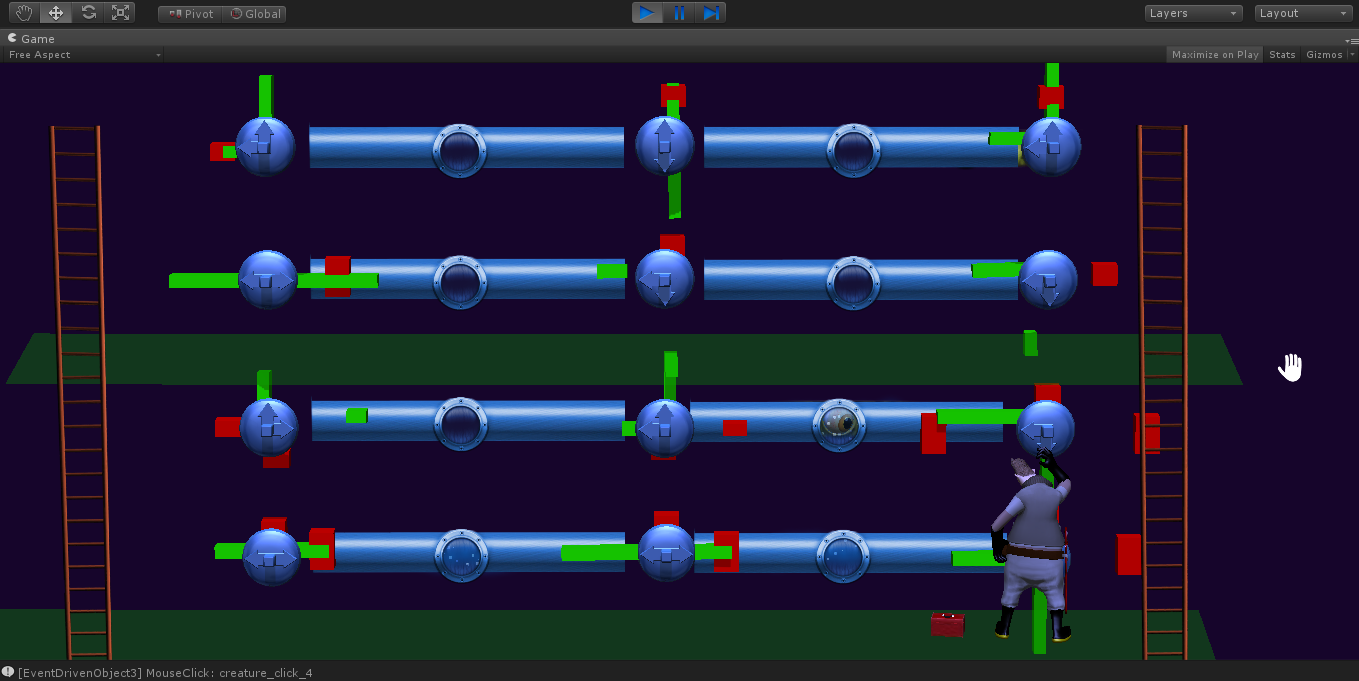
    pipe_madness

  • Chill everyone!

    Enjoy a frosty treat from Ace’s corner of the Universe. Drink responsibly!

  • Unity Coroutines

    I promised some insight into some of the problems Unity presents as a platform for development a while back. There’s no better time to blow off steam discuss those limitations and little land mines than when you’re experiencing one. As some of you might be aware, Unity has support for something called Coroutines for organization of things dependent on order of events, so it shouldn’t be a surprise that we’re utilizing this heavily for our event system.

    The pros: You can start these coroutines easily and control the flow just as easily. The StartCoroutine function will take a function from anywhere (like a modular collection of managed event objects that all have different operations like “Walk Over There” and “Pick This Up”), and just fire them off into an autonomous mode. Fire it off and forget it.

    The cons: Fire it off and forget it. You can’t stop them easily. There’s only one way to do it, and the implementation (called StopCoroutine, logically enough) is a shabby afterthought. It requires that you use an override of StartCoroutine that (as far as I’m aware) doesn’t support object oriented programming or code reusability, requiring the Coroutine functions you want to fire to be a part of the object doing the firing. The object doing the firing is my Event Manager. The operation needing to be fired is in a separate interface implementation, and for good reason.

    Put another way, let’s say I have an Event Management System that handles running all our operations. This is a system separate of the actual implementation of operations. Each type of operation needs it’s own “FireMeOff” function, because they all do different things but there’s no reason for the manager to know what each one needs to do. It should just see the required function is there for the operation and get it running and/or stop it if required to do so. As the Unity team has implemented this, unless every version of “FireMeOff” resides in my Event Manager, there will be no convenient way of stopping the Coroutines that get shot off into digital space.

    The apparent solution: Far from elegant … I’ll have to implement the control of my event Coroutines at the operation level, instead of the MANGER level, where it should be. This might include having to edit each operation to include special instruction for flushing out of the Coroutine. Not. Bueno.

    The much better solution, which I see no option for: If I were to fire off a Coroutine using StartCoroutine, I would like to be able to store the reference to the Coroutine as the StartCoroutine fires. E.G., Coroutine myCoroutine = StartCoroutine(myFunction());

    Ideally, I could then call myCourtine.Stop();

  • What is an Event Driven Object?

    Welcome back to the engineering corner of SV Rewards! Today I wanted to dive into some of the cool details that are allowing us to continue a pretty intense development effort efficiently without everyone knowing how to code. Enter the Event Driven Object system.

    What is an Event Driven Object?

    An EDO is basically a set of scripts that are designed to provide powerful plug-and-play options for interactive areas of the screen in Unity. When we need Ace to move, speak, use items, etc, etc, these EDO scripts take the helm and do what we tell them to, when we tell them to do it.

    Details, man!?”, you might ask feverishly …

    The skeletal structure for EDOs is as follows: Event Driven Objects contain different Triggers. Triggers can be anything like a mouse-click, mouse-drag or collision event. These Triggers fire off Sequences. Sequences are a group of instructional Operations and Conditions. Once triggered, the Sequences will check whether or not the Operations assigned to them should fire off as a result of user actions and the logical Conditions being met. Once the Sequence confirms the Conditions are met, it proceeds to handle all of our event Operations in the order we specified.

    Huh?

    The long and short of that paragraph (for the non-technical or lost-at-this-point) is that we have a system in place that allows our designers and non-coders to graphically add simple logic checking and game functionality. The functionality is broken up into modular pieces, so the process is similar to stringing pearls together.

    For example, the logic and associated functionality for picking up an item might look like the following: The current Character is Ace? The current Interaction is Hand? Start Sequence of Operations-> Walk to “Thinger” -> Play Animation “PickUpThinger” -> Add Inventory “Thinger” -> Add Points “3” -> End Sequence of Operations

    This is an over-simplification, of course, and a “Thinger” is not actually in the game (that I know of … yet), but an abstract idea for some item in-game. I can’t give away the real stuff! That might get me trouble with the management …

    Why is this important?

    Creating our core game functionality in a way that is modular (broken up into manageable pieces, and not crammed into one file or object) allows me to make sure that each piece of the game that is added can be tested individually and adding another piece to the puzzle doesn’t jeopardize large chunks of the game’s code. It also allows me to present the designers and other developers with a more simple way to make adjustments without the need for opening up and editing code. It also promotes code reuse, which ensures that we only have one version of the truth (the relevant code, all in one spot and only in one spot) for easy editing and testing.

    The lowest level of technical I’m comfortable going on this particular topic without actually giving out code:

    The EDO script is a container for a bunch of other scripts. In the programming world, to make things modular it is customary to create an Interface (sort of like a code contract) that other scripts will inherit and are contractually obligated to conform to as far as implementing functionality. For example, the event Operation scripts are based on an Interface that requires each and every Operation script to implement a set of functions (like “RunOperation()”, which is the entire purpose of Operations and there’s no reason to have an Operation script without it.)  Doing things this way has allowed us to implement and test many similar pieces quickly and keep it all well-organized.

    These EDO scripts are fed into a controller that handles the data (Sequences, Operations, etc) and uses the contractual functionality to produce the results that ultimately drive most of the interaction in the game.

    Wrapping Up

    That’s a very high-level view of the heart of the functionality that’s been developed for SpaceVenture. Going into much detail beyond is not something I’m allowed to do, however I can give plenty of examples that are not directly pulled from SpaceVenture’s code base, and will try to provide lower technical details on other topics Unity-related (and SV-relevant) if anyone is interested in my doing so. Just leave your feedback below and let me know what you want more or less of.

  • It’s Engie Time!

    Hello fellow backers!

    As the Lead Engineer on SpaceVenture, I wanted to take a second to introduce myself and welcome you to my corner of the SV Rewards blog! As you guys and gals may know, it’s no small feat to produce something epic. Especially when it’s “Two Guys from Andromeda” epic, which goes to 11. There’s a lot going on in the background non-stop and we really try to sum it all up biweekly in a non-technical and spoiler-free fashion. My hope is to let some of the technical shine through in my posts and any of you that are interested in the game development process can learn a little bit. As time and inspiration allows I’ll be preparing a few behind-the-scenes / making-of / directors-cut / platinum-edition posts for everyone to get a feel for all these “systems” you keep hearing about throughout our update emails.

    A little about me: Space Quest III was my first rodeo with adventure games. I would go to a friend’s house, commandeer his computer, and fire up that game. He lived on a huge plot of land with beautiful woods, trails and a lake. I didn’t want anything to do with those. Go away. I was playing Space Quest III. The spiral out to other Sierra games came on pretty quickly after that experience and I eventually made myself familiar with any Sierra game I could get my hands on. These games helped me pick a direction very early in life and the rest is history.

    Every day we’re pushing to bring you a great experience, not only as the talent employed by the Masters of Comedic Virtual Suicide, but also as fans.

    Thanks for reading and be on the lookout for an insider report on our narrative and event-driven systems!

    -Tyler

  • Ace finds himself in a tight spot

    So for the last few days, Mark, Scott and I have been camped out in South Carolina spending time with our senior programmer, Tyler Drinkard. Pushing 16 hour days have been exhausting but well worth it! We have made major head way towards the finish line. One thing that happened today that was really exciting was going through the brain storm process with Mark and Scott. There is a portion of the game near the end that has never felt quite fleshed out in terms of puzzle and story.

    Essentially, without spoiling anything major, Ace lands on a planet and there is a small puzzle that needs to be figured out to progress. The issue that we had there was trying to work out the comedy and make the portion of the game worth while. A lot of ideas went back and forth as to what would workout and what wouldn’t. And of course, there must be some good parodies involved! Well let me just say, you won’t be disappointing in the least. I nearly spit soda all over my laptop a few times.

    Anyway, the below picture isn’t meant to show any of the comedy, and it is very vague, but Mark drew this up while we were discussing everything. I figured I’d share it here. It shows Ace in a very tight spot that he will be in during this portion of the game..

    -Chris Pope

    Mark_Rough_Ace_Sketch


  • SpaceVenture Demo Playthrough Commentary with Chris Pope

    Hey everyone! As mentioned in our previous Kickstarter Update, we are wanting to start showing more on this site. In a small push off to make that happen, I wanted to share a commentary I put together demonstrating the July 2013 demo of SpaceVenture. I hope you all enjoy it! 🙂

  • Eat your heart out Michael Bay!

    Move over Autobots… a new transformer is here to save the day.

    Kudos to 3D Artist/Animator Michael Penny

    [jwplayer config=”Custom Player” mediaid=”392″]

  • Character development

    The following images give some idea of the evolution of a character concept. Artist Brent Forrest provided a couple different takes for a character called Nurbs, who is one of Ace’s pals in the story. I did a quick clay sculpt of my interpretation and Brent refined the character further based on the sculpt. Coming up with crazy alien characters is one of the most fun parts for me and it’s been a blast working closely with such a talented character artist as Brent.

    image4
    image6
    image3
    image5